From the GeoClaw Tsunami Tutorial
The directory $GTT/CopalisBeach/example1
contains some initial GeoClaw setrun and setplot functions to start
exploring tsunami modeling.
See Copalis Beach example1 for more about these examples.
Fetch the sample results
The code cell hidden below runs fetch_sample_results.py to download the
subdirectory sample_results that provides the figures shown on this page.
Source
run fetch_sample_results.pyOutput
GTT path is  /home/runner/work/geoclaw_tsunami_tutorial/geoclaw_tsunami_tutorial/GTT
setting GTT =  /home/runner/work/geoclaw_tsunami_tutorial/geoclaw_tsunami_tutorial/GTT
extraction_path =  /home/runner/work/geoclaw_tsunami_tutorial/geoclaw_tsunami_tutorial/GTT/CopalisBeach/example1
new_file_fullpath =  /home/runner/work/geoclaw_tsunami_tutorial/geoclaw_tsunami_tutorial/GTT/CopalisBeach/example1/sample_results
Not overwriting file or directory that already exists:
 /home/runner/work/geoclaw_tsunami_tutorial/geoclaw_tsunami_tutorial/GTT/CopalisBeach/example1/sample_results
Specify force=True to overwrite
Data is cached at:  /tmp/tmp4q93395g/clawpack/geoclaw/GTT_data/CopalisBeach/example1/sample_results.zip
Directory now exists:  /home/runner/work/geoclaw_tsunami_tutorial/geoclaw_tsunami_tutorial/GTT/CopalisBeach/example1/sample_results
The setrun files defined in this directory are all nearly identical, but
allow a different number of refinement levels. The coarsest (3-level) case
runs quickly and shows how things are refined in most of the domain.
The other versions add refinement levels only near Copalis Beach, and so the
full domain plots look nearly identical and are not shown in the videos below.
See Setting up the GeoClaw run for detailed description of the setrun1a.py
script, and output1a
Run times
Here’s a summary of some run times, but note that these may vary from run to run (even on the same computer), particularly for short runs.
These runs were done on a Macbook Pro with the M1 chip and 6 OpenMP threads.
| example | finest-level grid resolution | elapsed wall time | Total CPU time |
|---|---|---|---|
| setrun1a | 24 arcsec (level 3) | 35 seconds | 181 seconds |
| setrun1b | 6 arcsec (level 5) | 314 seconds | 1716 seconds |
| setrun1c | 1 arcsec (level 7) | 465 seconds | 2602 seconds |
| setrun1d | 1/3 arcsec (level 8) | 1780 seconds | 10275 seconds |
More details about the run time is summarized in a table that gets written
to the timing.txt at the end of a run (this information is also printed
to the screen). For example, here’s _output1d/timing.txt:
============================== Timing Data ==============================

Integration Time (stepgrid + BC + overhead)
Level           Wall Time (seconds)    CPU Time (seconds)   Total Cell Updates
  1                     1.241                  2.417            0.999E+06
  2                     2.487                  9.488            0.115E+08
  3                    36.296                190.706            0.271E+09
  4                   183.886               1077.718            0.170E+10
  5                    13.987                 62.963            0.950E+08
  6                    33.994                169.437            0.276E+09
  7                   192.710               1065.166            0.169E+10
  8                  1249.079               7478.786            0.116E+11
total                1713.681              10056.682            0.156E+11

All levels:
stepgrid             1673.687               9936.121
BC/ghost cells         18.104                 98.417
Regridding             51.003                162.183
Output (valout)         0.361                  0.341

Total time:          1779.518              10275.146
Using  6 thread(s)

Note: The CPU times are summed over all threads.
      Total time includes more than the subroutines listed above
Note: timings are also recorded for each output step
      in the file timing.csv.
Note that more than 15 billion grid cells were updated during this computation (counting each grid cell on every level for each time step on that level). You can also see that the majority of the work was done on the finest Level 8 grids.
You can also view plots of these timing results for the
various runs from the link that shows up at the
bottom of the _PlotIndex.html file in each _plots directory.
Here’s just one of the timing plots, from _plots1d for the finest level run:
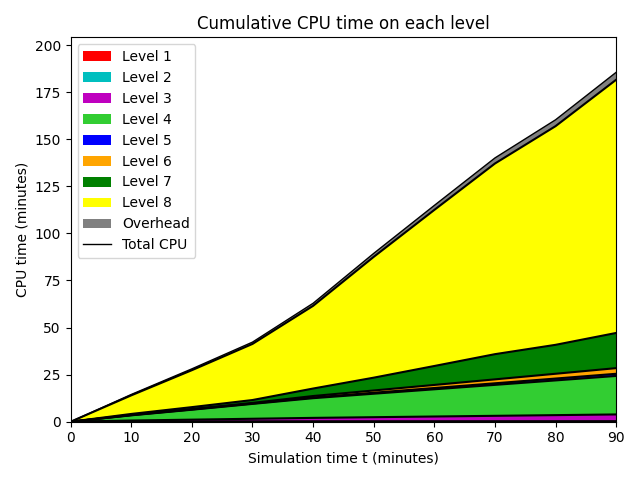
This shows the cumulative CPU time (which are collected in
the file timing.csv in the _output directory at each output time, and
for these runs output every 10 minutes was specified). Again we see that
the majority of the work was done on Level 8. Note also the gray section
above the yellow Level 8 section on the plot. This shows the amount of time
spent on “overhead” related to the way the AMR is implemented. This cost
of using AMR is tiny compared to the cost savings inherent in putting finer
grids only where they are really needed!
Four _plots directories are created if you run the make_all.sh script,
as described in Copalis Beach example1.
Comparison of the inundation
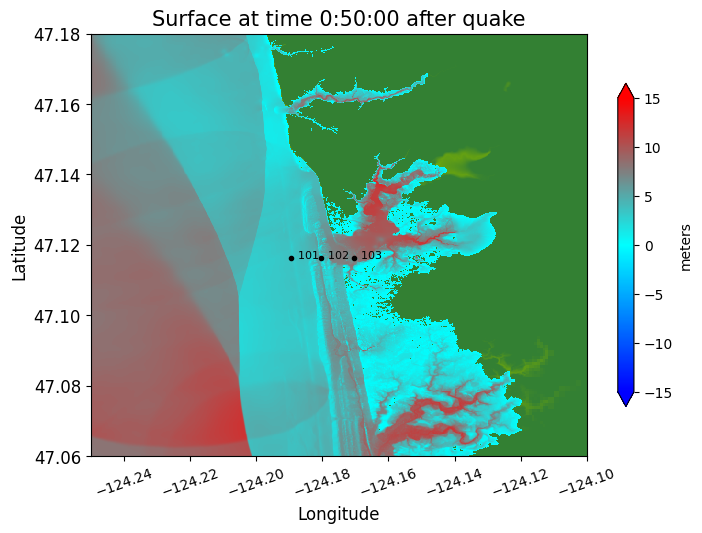
Shown around Copalis Beach with different finest-level resolution, at time 50 minutes.
These plots also show the location of 3 gauges. See Gauge comparisons below for comparisons of time series at these gauges as computed with the different resolutions shown here.
24" resolution
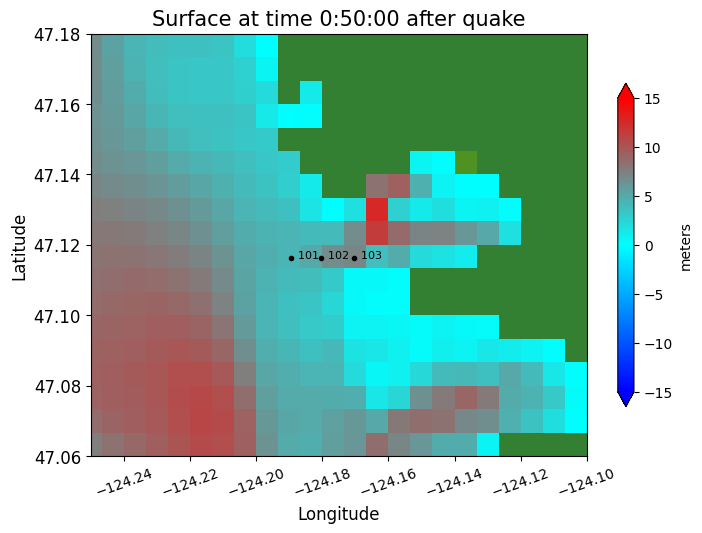
6" resolution
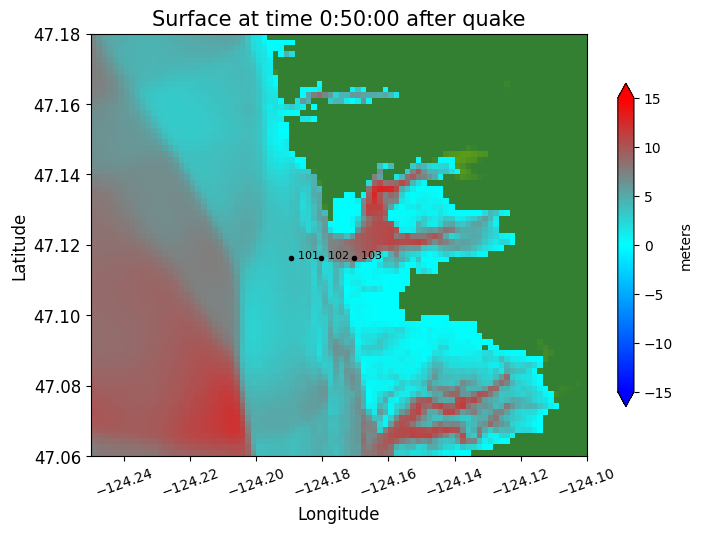
1" resolution
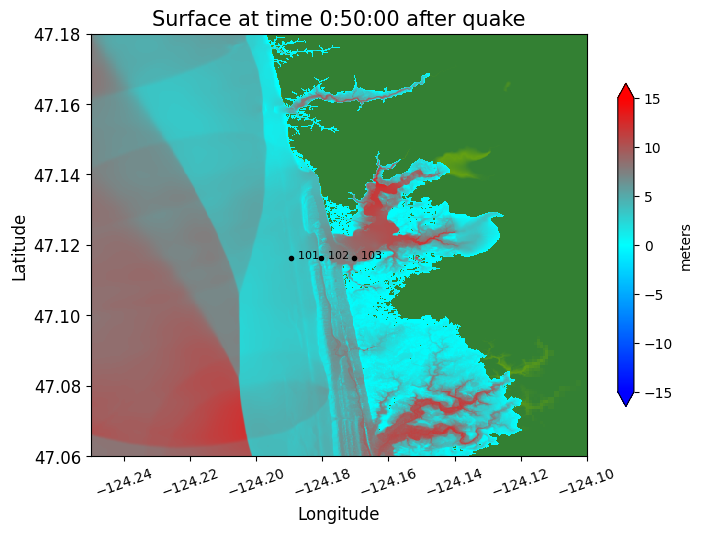
1/3" resolution
Gauge comparisons
The plots below were created by the Python script compare_gauges.py.
It reads the gauge results for a gauge from each of the 4 _output directories
and plots the time series together on the same plot.
Time series at two different gauges are shown: Gauge 101 is just offshore, initially in about 5 meters depth, and Gauge 102 is onshore, at a point that is initially dry.
Note that we plot different quantities at the gauges: at the offshore Gauge 101 it is best to look at the water surface elevation (relative to the vertical datum of the topofile used in this region), while at the onshore Gauge 102 it is better to look at the water depth above the topography.
See Gauges for discussion of why this choice is best, and several other types of plots that you might want to produce at gauges.
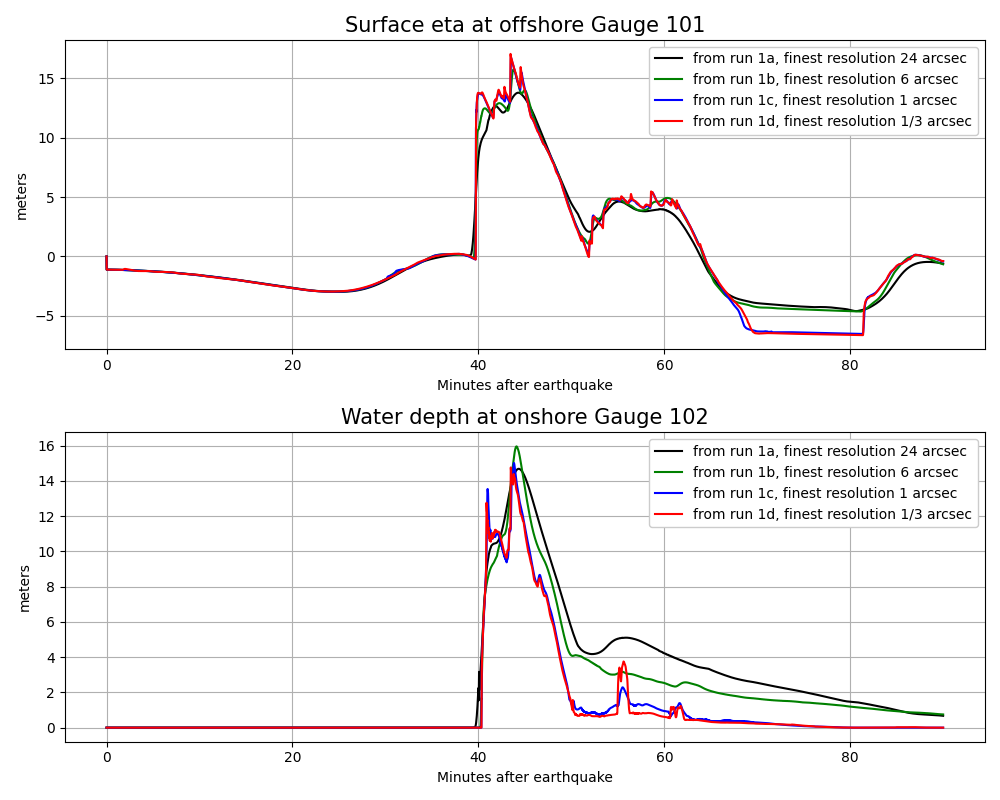
Note from these gauge plots:
Even the very coarse and badly under-resolved simulation of case
1aproduces reasonable estimates of the maximum wave heightetaoffshore at Gauge 101 and also the maximum inundation depthhat the onshore Gauge 102.Adding more levels of refinement improves the resolution of the results significantly from case
1ato1bto1c, but there is little difference between the case1cresults with 1 arcsec resolution and case1dwith 1/3 arcsec resolution. This is a good indication that the results are converging to the “correct” solution for this particular model (solving the shallow water equations with the given topo and dtopo files).
Videos
Full domain from 3-level run
Computed using setrun1a.py with 24" resolution around Copalis
The other versions add refinement levels only near Copalis Beach, and so the full domain plots look nearly identical and are not shown below.
Right click and select “Show all controls” to find the Play button.
Inundation around Copalis from 3-level run
Computed using setrun1a.py with 24" resolution around Copalis
Right click and select “Show all controls” to find the Play button.
Inundation around Copalis from 5-level run
Computed using setrun1b.py with 6" resolution around Copalis
Right click and select “Show all controls” to find the Play button.
Inundation around Copalis from 7-level run
Computed using setrun1c.py with 1" resolution around Copalis
Right click and select “Show all controls” to find the Play button.
Inundation around Copalis from 8-level run
Computed using setrun1d.py with 1/3" resolution around Copalis
Right click and select “Show all controls” to find the Play button.